
BelongAI Dave - Cancer Mentor
BelongTailMedical
4.433.00 Reviews
- Version
- 2.8.6
- Installs
- 10.00K
- Age Rating
- Teen
Screenshots
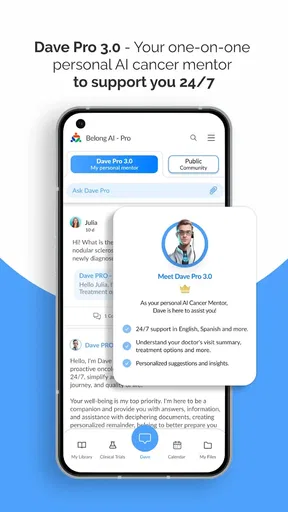
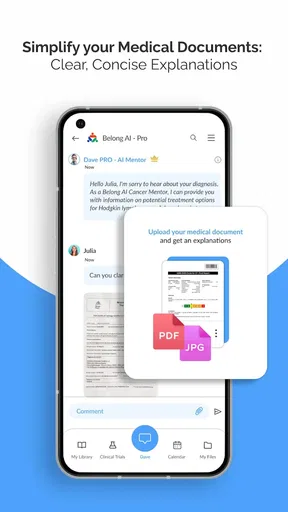
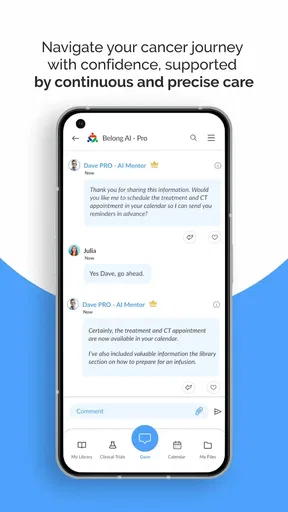
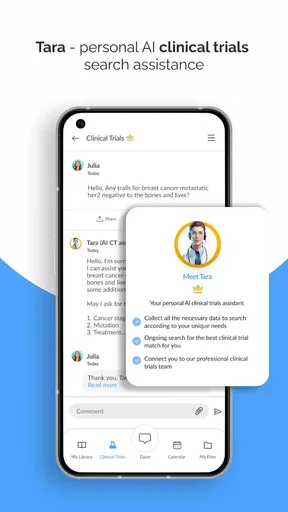
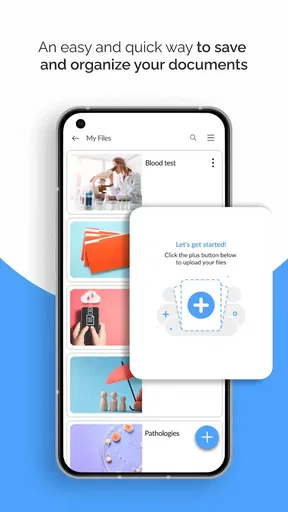
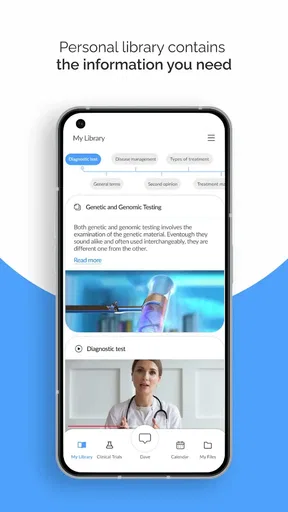
Our Review of BelongAI Dave - Cancer Mentor
 Analysis by Appyee
When cancer care starts to fill every day with appointments, questions, reports, and unfamiliar terms, it is easy to feel that you are always trying to catch up. I found BelongAI Dave - Cancer Mentor most useful in that exact situation: not as a replacement for a medical team, but as a companion for organizing questions and making health information easier to approach. It is a free medical app from BelongTail, aimed at people living with cancer and the people supporting them.
The central idea is an AI mentor that can help users take a more proactive role in their cancer journey. That sounds simple, but the value depends heavily on how you use it. If you expect a diagnosis, treatment decision, or emergency assessment from a chat tool, this is the wrong kind of app. If you want help turning a confusing concern into a clearer conversation with a clinician, it has a more practical place in your routine.
My overall impression is cautiously positive. The app has a focused purpose, a free entry point, and a current version of 2.8.6 that runs on Android 8.0 or later. Its average rating is 4.4, based on 81 ratings, and it has passed 10K+ installs, which suggests that it has found an audience without making it feel like a crowded general-purpose health platform.
From a difficult question to a more useful next step
I’ll begin with the moment a concern arises and show how I’d turn it into a clear, manageable question. The next section follows that question into a practical workflow, with the focus on preparing for a useful conversation with the care team rather than seeking certainty from an app.
Starting with the real problem, not the app
The best way to begin with BelongAI Dave is to identify what you need help with before opening the conversation. “I am worried about cancer” is understandable, but too broad to produce a useful workflow. A more workable starting point might be a question about preparing for an oncology appointment, understanding a term in a report, keeping track of symptoms, or explaining a concern to a family member.
I would treat the first message as a rough note rather than a polished medical question. Write what happened, what you already know, and what you want to decide next. For example, after receiving a new treatment instruction, you might want to understand which points deserve clarification at the next visit. The app can then serve as a thinking aid instead of becoming another source of information that you have to sort through.
This distinction matters because cancer information is unusually personal. The same word can mean something different depending on the type of cancer, stage, treatment plan, other conditions, and the person’s medical history. An AI response may help you frame a question, but it should not be treated as a personalized clinical order. Use the conversation to prepare for care, not to bypass care.
A practical step-by-step workflow
I recommend using the app in four passes. First, describe the situation in plain language. Second, ask it to separate general information from points that need confirmation by your doctor or nurse. Third, turn the answer into a short checklist. Finally, take that checklist to the appropriate member of your care team.
This approach is more useful than asking a long series of disconnected questions. It creates a small handoff document in your own words. You are not trying to preserve every sentence from the conversation; you are trying to leave with a manageable set of questions, warning signs to discuss, and practical details to remember.
A helpful technique is to ask for explanations at two levels. Start with a plain-language version, then ask which terms you should write down and discuss with a professional. This can reduce the common problem of understanding each sentence separately but missing the main decision. It also gives you a way to notice when the answer is too general for your situation.
Another useful habit is to keep personal identifiers and unnecessary sensitive details out of the initial message. Share only what is needed to explain the question. If a detail changes the medical context, mention it clearly; if it does not affect the question, leave it out. That keeps the conversation easier to review and reduces the amount of private information placed into a digital tool.
What the handoff to clinicians looks like
The app becomes more valuable when its output leaves the chat and reaches a real person. Before an appointment, I would reduce the discussion to three sections: what has changed, what I do not understand, and what decision or instruction I need clarified. That structure is easier for a busy clinician to answer than a screen full of copied text.
For a family caregiver, the handoff can be even more concrete. You could use the conversation to prepare a shared list of questions, then check that the patient agrees with the wording before bringing it to the appointment. This helps avoid a subtle but important problem: relatives may focus on information they find reassuring or alarming while the patient needs answers about a different issue.
The same process works after a consultation. If you leave with several new terms or instructions, use the app to identify which parts you should review with the clinic rather than assuming that an explanation is confirmation. In my view, this is one of the strongest realistic uses for an AI cancer mentor: it can help turn a stressful appointment into a sequence of follow-up questions.
There is also a handoff between the patient and the app itself. The quality of the next response depends on how clearly you explain the context. If you receive an answer that sounds confident but does not reflect your treatment situation, stop and restate the question more narrowly. Do not keep asking until the answer matches what you hoped to hear.
An everyday scenario where it earns its place
Imagine opening a treatment summary in the evening and finding a phrase you do not understand. The clinic is closed, your appointment is several days away, and searching the wider internet produces pages that range from highly technical to frighteningly speculative. In that moment, I would use BelongAI Dave to ask for a plain-language explanation, identify the exact term, and create a short list of questions for the next call or visit.
The outcome is not a diagnosis. The useful outcome is that the vague worry becomes specific: “What does this phrase mean in my report?” “Does it relate to the treatment I am receiving?” “Which part should my oncologist explain?” That change can make the next conversation more efficient and may help you feel less powerless while waiting.
A second scenario involves a caregiver who remembers that the doctor gave several instructions but cannot recall which details were most important. The app can help organize the memory into questions and topics. However, the caregiver should still check the original clinical instructions and contact the care team when timing, dosage, symptoms, or urgent concerns are involved.
Where the workflow breaks
The biggest limitation is also the most important safety boundary: an AI mentor cannot examine you, review your complete medical record, observe a symptom, or take responsibility for a treatment decision. A polished answer can still be incomplete. Cancer care is full of exceptions, and a general explanation may not apply to your diagnosis or current therapy.
I would not use the app as the only response to severe, sudden, or rapidly worsening symptoms. In those situations, contact the relevant medical service or emergency help instead of waiting for a chat response. The same caution applies to medication changes. Do not start, stop, delay, or alter treatment because an AI conversation appears to suggest it.
Another point of friction is emotional. People dealing with cancer may ask the same question repeatedly because they are frightened, tired, or hoping for certainty. An AI can respond patiently, but patience is not the same as reassurance from someone who knows your case. If the conversation increases anxiety, it may be better to close the app and speak with a nurse, doctor, counselor, or trusted person.
The app may also feel less suitable for users who want a complete medical record system, appointment manager, or direct connection to their hospital. BelongAI Dave is better understood as a cancer-focused information and preparation tool. Someone seeking formal clinical messaging or a full treatment-tracking platform may prefer tools supplied by their healthcare provider or a dedicated health-record service.
What to expect from cost and access
BelongAI Dave is free to install, which makes it easy to try without committing money at the beginning. It carries a Teen content rating, an appropriate signal that the subject matter can be serious and that younger users may need guidance from a parent or responsible adult. The app also includes in-app purchases ranging from $0.49 to $179.99 per item, so I would check the purchase screen carefully before treating the free starting point as the complete long-term experience.
For a family, that pricing detail is worth discussing before anyone taps a purchase option. A patient may assume that every useful part is included, while a caregiver may prefer to understand the available spending first. I would also avoid making a purchase during a stressful moment simply because the app presents it as the quickest route forward. Take time to decide whether the additional value matches your actual need.
Android users with an older device should check compatibility before planning around it. The minimum operating system is Android 8.0, so the app is accessible to many existing phones, but not every older handset will qualify. That is a small practical issue, yet it matters when the person using the app is relying on a family member’s spare device or has limited access to technology.
How it compares with ordinary alternatives
The usual alternative is a general web search. Searching can provide more breadth, but it also creates a heavy filtering burden. You may encounter outdated pages, highly technical explanations, personal stories presented as medical advice, and results that are not relevant to your situation. A focused cancer mentor offers a more conversational starting point and can help turn a concern into a question.
The opposite alternative is asking only a clinician. That remains the right choice for diagnosis, treatment, urgent symptoms, and decisions specific to your body. The trade-off is timing: appointments are limited, and people often remember their best question after leaving the clinic. BelongAI Dave fits in the space between visits, helping you prepare without pretending to provide the authority of a medical professional.
Another alternative is a notebook. I would not dismiss it. A notebook is private in a familiar way, works without a learning curve, and is excellent for recording symptoms, appointments, and questions. The app is more useful when you need help phrasing a confusing topic or breaking down medical language. The strongest combination may be to use the app for preparation and a notebook for the final list you take to your care team.
Support groups and cancer organizations offer something the app cannot: human experience, emotional understanding, and sometimes practical knowledge about living through treatment. They can be helpful alongside it, but they should not replace professional guidance either. The best choice depends on the job. For clinical decisions, use clinicians; for emotional connection, use trusted people and support communities; for question preparation, this app can be a convenient middle layer.
Small habits that improve the result
One non-obvious advantage of a focused workflow is that it exposes missing context. If you cannot explain what you are asking, that itself may be a sign that you need to return to your report, discharge instructions, or clinic notes before continuing. I would use the app as a prompt to identify the gap, not as a way to cover the gap with assumptions.
A second useful habit is to label every answer mentally as either “background,” “question for my team,” or “action requiring professional confirmation.” This prevents a general explanation from quietly turning into a personal instruction. It also makes the conversation easier to share with a caregiver without presenting it as an official medical document.
Third, use the app before the moment of maximum stress when possible. Preparing questions the night before an appointment is usually more productive than trying to process everything immediately after receiving difficult news. If you are supporting someone else, ask permission before turning their health concerns into a long digital conversation. Control over the process matters, especially when a person already feels that many decisions are being made around them.
Finally, compare the app’s response with the wording of your own care instructions rather than with random online claims. If there is a conflict, the care team wins. That rule sounds obvious, but it is easy to forget when an AI answer is written clearly and confidently.
Who should use it, and who should skip it
I think BelongAI Dave is a good fit for adults living with cancer who want help preparing questions, understanding terminology at a general level, or organizing conversations between appointments. It may also help caregivers who need a structured way to think through what to ask, provided the patient’s preferences remain central.
I would skip it as a primary tool if you need emergency assistance, a formal medical record, direct clinician messaging, or a guaranteed personalized interpretation of test results. I would also be cautious if interacting with health information tends to increase your anxiety. In that case, a trusted clinician or support person may be more helpful than another stream of medical explanations.
The developer, BelongTail, has kept the product’s identity focused on cancer mentoring rather than presenting it as a universal health assistant. That focus is useful, but it also raises the standard for responsible use: the narrower the subject, the more tempting it is to assume that the app understands your specific case. It does not remove the need for judgment.
My final assessment after following the workflow
BelongAI Dave works best when the desired result is modest but meaningful: a clearer question, a better-prepared appointment, or a more organized conversation with a caregiver. It is not the destination of cancer care. It is a bridge between the moment a concern appears and the moment you can discuss that concern with someone qualified to act on it.
I like the free starting point and the focused medical purpose, and the 4.4 average gives it a reassuring first impression without being a reason to trust every answer automatically. The Teen rating also makes sense for the subject matter. Still, the presence of in-app purchases means I would review each paid option carefully, and I would keep the app’s role firmly limited to education and preparation.
My recommendation is to try it with one clearly defined task. Ask it to help you turn a confusing term or appointment concern into a short, practical list. Then take that list to your healthcare team and judge the app by whether it improved that conversation. If it helps you ask better questions without encouraging you to replace professional care, it is doing the job I would want from a cancer mentor.
Verdict
Strengths of BelongAI Dave - Cancer Mentor
- Provides personalized cancer information in a conversational format.
- Can help users prepare questions for oncology appointments.
- Available for support and guidance beyond regular clinic hours.
- May make complex medical terms easier for non-specialists to understand.
- Useful for tracking concerns and organizing thoughts during treatment.
Limitations of BelongAI Dave - Cancer Mentor
- AI responses should not replace advice from a qualified cancer specialist.
- Information quality may vary depending on the question and cancer type.
- Users may need to share sensitive health details to receive tailored guidance.
- Not all features or support options may be available in every country.
- People seeking urgent medical help still need to contact emergency services directly.
Similar Picks in This Category
View All
WebMD: Symptom Checker
WebMD, LLC4.1

Microphone Amplifier
DOSA Apps4.2

Anatomy Learning - 3D Anatomy
3D Medical OU4.5

Period Tracker and Calendar
SimpleInnovation4.9

GoodRx: Prescription Coupons
GoodRx4.8

CVS Health
CVS Pharmacy4.5
Frequently Asked Questions
What is BelongAI Dave - Cancer Mentor, and who is it designed for?
BelongAI Dave - Cancer Mentor is a cancer support and information app designed to help patients, caregivers, and families navigate the cancer journey. It can provide educational content, practical guidance, and access to a supportive community. The app may be useful from diagnosis through treatment and follow-up, but it should complement—not replace—personal advice from an oncologist or other qualified healthcare professional.
Can BelongAI Dave provide medical diagnoses or recommend cancer treatments?
No. BelongAI Dave should not be treated as a diagnostic tool or as a substitute for professional medical care. Its information and conversational support may help users prepare questions, understand general cancer-related topics, and organize their thoughts, but it cannot examine you, interpret your complete medical history, or make individualized treatment decisions. Always confirm important information with your oncology team before changing medication, treatment, diet, or appointments.
What kind of support and information can users find in the app?
The app is intended to offer accessible cancer-related education, emotional support, and practical help during a difficult period. Depending on the available features and your location, you may find answers to common questions, guidance for discussing concerns with clinicians, community-based support, and resources for caregivers. Content can vary by cancer type and situation, so users should check whether information applies to their diagnosis and treatment plan.
Is my personal health information safe when using BelongAI Dave?
Before entering sensitive details, review the app’s privacy policy, permissions, and account settings carefully. Cancer-related information is highly personal, and users should understand how conversations, profile data, and community posts may be stored, processed, or shared. Avoid posting identifying information in public areas, use a strong unique password, and contact the developer if you need clarification about data retention, deletion requests, or third-party services.
Is BelongAI Dave suitable for urgent symptoms or emotional crises?
The app is not intended for emergencies. If you experience severe symptoms, a possible treatment reaction, difficulty breathing, chest pain, uncontrolled bleeding, or another urgent concern, contact local emergency services or your medical team immediately. Likewise, anyone experiencing thoughts of self-harm should seek immediate crisis support from local emergency services or a trusted crisis hotline rather than relying on an in-app conversation.
